How to use the VSCode with a SSH mount point

You can use SSH through sshfs or sftp to mount a cluster folder as a disk on your computer, and then open files and projects with any software installed on your computer.
Tune VSCode
When used with VSCode, this approach can be network intensive, so please tune VSCode to limit the network exchanges.
Mount point with sshfs
Install
You must install sshfs from your distribution repository. On ubuntu like distribution you have to type
MacOS users may use sshfs and Macfuse.
Keep in mind that MacOS will pollute your remote directory with many hidden files and directories named .DS_Store and .AppleDouble.
Windows users may use sshfs-win but we didn't test it.
Alternatively, users can install and use the Linux sshfs through WSL. They can use then WSL extension for VSCode to edit files in the WSL environment, including the ones accessible through sshfs.
Use
As an example, we will mount, on our personal computer, the folder ~/work available on the cluster.
Every command must be run on your personal computer.
Mount a remote directory
Now you can access and manipulate files on the cluster. Keep in mind that files still on the cluster.
Unmount a remote directory
To remove a sshfs volume, type the following command:
If you didn't close files from sshfs volume beforehand, you will get an error when trying to remove volume. You must close the programs that use them. In same way, if you still in the sshfs volume with a terminal, you must close it or cd elsewhere:
less 290468 <user> 4r REG 0,126 2399 7 /home/<user>/sshfs/work/<my-project>/README# Exit/quit the command(s) listed above and then umount it againfusermount -u ~/sshfs/work/
Mount point with a Linux desktop file browser
As an alternative of sshfs, you can use the ability of your Linux file browser to mount a remote folder as a disk by using sftp protocol.
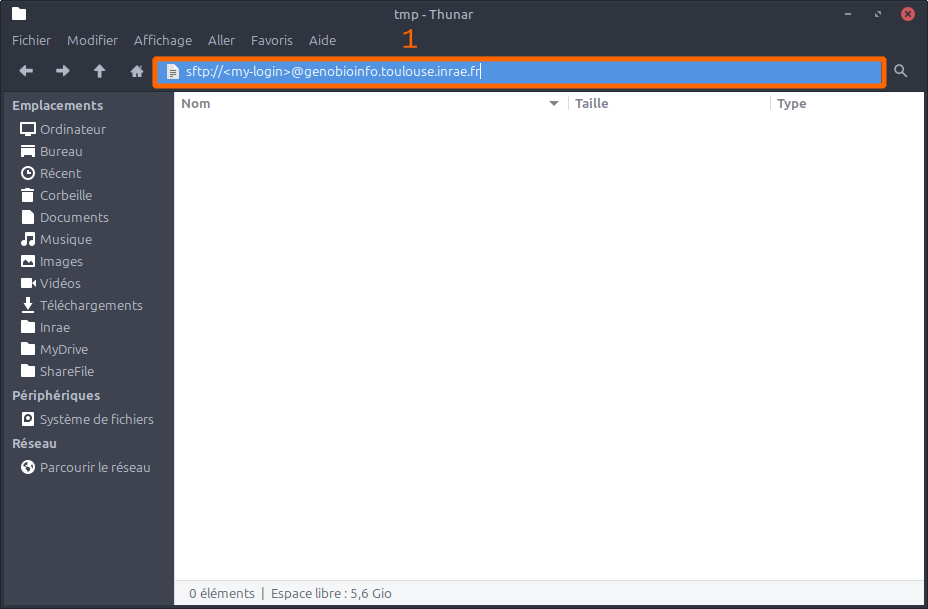
- Mount a remote directory: Most of the time, you just have to double-click on the address bar in your file browser, type
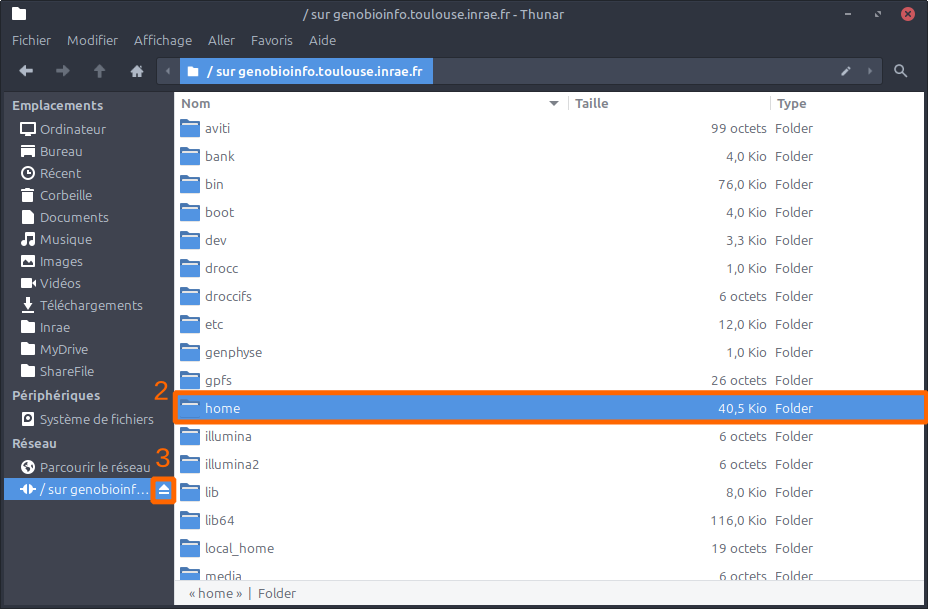
sftp://<my-login>@genobioinfo.toulouse.inrae.frwhere your replace<my-login>with your login, and validate by pressing Enter. Your password may be asked. - When you are connected, you are at the root of the cluster file system. You must navigate in it in order to find your files.
- Remove a remote directory: Most of the time, you can use the disconnect button to remove the remote volume.